

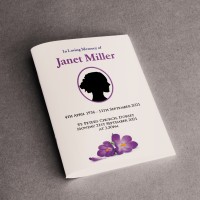
Beautifully produced A5 booklets, printed to a high standard with careful attention to detail.
We're here to make the process as simple and stress-free as possible. Please either order online through this page or email us with your requirements and we'll reply quickly with a quote and a payment link.
Why choose us:
- Trusted by local and national funeral directors
- Fast turnaround — often one or two days
- Premium A5 booklets in 4, 8, 12, 16+ pages
- High quality card and paper
- Careful proofing and quality checks
Delivery
We can deliver directly to your home, funeral director, or the venue — wherever is most helpful for you.
Explore our blog for tips on designing a funeral Order of Service or check our artwork guide.
How it works
We'll need to have a file that is ready to print, or we can help you make one if you select 'please make a design for me'.
The number of pages is how many A5 'sides' there are in the finished booklet. Many funeral orders of service are "4 pages" which print out as a single sheet of card, folded in half.
You'll be able to upload your file and write any instructions during checkout
We don't print anything automatically. We'll check your order and email you a PDF proof for you to approve first. This shows the final layout as it would print, and allows you to check for any mistakes.
Once you approve your PDF proof, we'll get started and email you once we've dispatched your order.
We print most orders in a day, but please give us more time if you can.
File Types
We need a ready-to-print file of single pages in reading order. We recommend using a minimum of font size 12. A Word Document is fine, though PDFs are better.
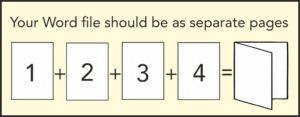
Please don't try to lay it out as a booklet (ie: putting 2 pages on 1 sheet), as we will do all the 'booklet making' on our end.
This means that if you want an 8-page booklet, your Word document should have 8 pages. The number of pages must always be divisible by 4, so a 6-page document would need 2 blanks to make 8.
Preparing your file
The ideal: a press-ready PDF The best thing you can send us is a PDF exported at 'Press Quality' (or 'High Quality Print') settings, set up with 3mm bleed and cropmarks. Bleed means your design extends slightly beyond the cut edge, so there are no white borders after trimming.
Not sure how to do this? Canva makes it straightforward — export as PDF Print and tick the 'Crop marks and bleed' box. For Adobe InDesign or Illustrator, use File → Export → PDF (Print) and choose the Press Quality preset. Our full artwork guide is at copycentre.com/artwork.
For professional designers
- Colour mode: CMYK
- Resolution: 300 dpi minimum at final print size
- Bleed: 3mm all sides
- Safe zone: keep important text and logos 4mm inside the trim edge
- Fonts: embed all fonts or convert to outlines before exporting
- Cropmarks: include (offset 3mm from trim edge)
- File format: PDF/X-1a or PDF/X-4 preferred; PDF (Press Quality) also accepted
We also accept: JPEG, TIFF, PNG, Word, PowerPoint, and Publisher files.
Whatever you send, you'll see a proof first.
Print & product specifications
- Coated Silk card: Smooth, bright white, with a subtle sheen. Colours look vivid and photographs reproduce beautifully. Our most popular choice
- Uncoated card: Natural, slightly textured finish. Better for handwritten additions or a more traditional feel
- Paper: FSC-certified from mixed sustainable sources
Turnaround
- Production starts once you've approved your PDF proof
Not found what you're looking for?
Get in touch!Funeral Order of Service Booklets
|
Format
Finish
Paper Type
Printed
Paper Thickness
Design
Order within Collect after 4pm:
02-04-26
Delivered by:
07-04-26
01277 634 508
Quantity
Price
£
 - Zero Rated
|
More Prices
Click a price below to add an item, based on your chosen printing options above, to the basket.
| 4 pages | 8 pages | 12 pages | 16 pages | 20 pages | 24 pages | 28 pages | 32 pages | 36 pages | |
|---|---|---|---|---|---|---|---|---|---|
| 25 |
|
|
|
|
|
|
|
|
|
| 50 |
|
|
|
|
|
|
|
|
|
| 100 |
|
|
|
|
|
|
|
|
|
| 150 |
|
|
|
|
|
|
|
|
|
| 200 |
|
|
|
|
|
|
|
|
|
How it works
How it works
We'll need to have a file that is ready to print, or we can help you make one if you select 'please make a design for me'.
The number of pages is how many A5 'sides' there are in the finished booklet. Many funeral orders of service are "4 pages" which print out as a single sheet of card, folded in half.
You'll be able to upload your file and write any instructions during checkout
We don't print anything automatically. We'll check your order and email you a PDF proof for you to approve first. This shows the final layout as it would print, and allows you to check for any mistakes.
Once you approve your PDF proof, we'll get started and email you once we've dispatched your order.
We print most orders in a day, but please give us more time if you can.
Product Specifications
File Types
We need a ready-to-print file of single pages in reading order. We recommend using a minimum of font size 12. A Word Document is fine, though PDFs are better.
Please don't try to lay it out as a booklet (ie: putting 2 pages on 1 sheet), as we will do all the 'booklet making' on our end.
This means that if you want an 8-page booklet, your Word document should have 8 pages. The number of pages must always be divisible by 4, so a 6-page document would need 2 blanks to make 8.
Preparing your file
The ideal: a press-ready PDF The best thing you can send us is a PDF exported at 'Press Quality' (or 'High Quality Print') settings, set up with 3mm bleed and cropmarks. Bleed means your design extends slightly beyond the cut edge, so there are no white borders after trimming.
Not sure how to do this? Canva makes it straightforward — export as PDF Print and tick the 'Crop marks and bleed' box. For Adobe InDesign or Illustrator, use File → Export → PDF (Print) and choose the Press Quality preset. Our full artwork guide is at copycentre.com/artwork.
For professional designers
- Colour mode: CMYK
- Resolution: 300 dpi minimum at final print size
- Bleed: 3mm all sides
- Safe zone: keep important text and logos 4mm inside the trim edge
- Fonts: embed all fonts or convert to outlines before exporting
- Cropmarks: include (offset 3mm from trim edge)
- File format: PDF/X-1a or PDF/X-4 preferred; PDF (Press Quality) also accepted
We also accept: JPEG, TIFF, PNG, Word, PowerPoint, and Publisher files.
Whatever you send, you'll see a proof first.
Print & product specifications
- Coated Silk card: Smooth, bright white, with a subtle sheen. Colours look vivid and photographs reproduce beautifully. Our most popular choice
- Uncoated card: Natural, slightly textured finish. Better for handwritten additions or a more traditional feel
- Paper: FSC-certified from mixed sustainable sources
Turnaround
- Production starts once you've approved your PDF proof
Not found what you're looking for?
Get in touch!